Food Savers
We'll help you reduce food waste
Overview
Urban food shoppers need a way to organize their shopping needs because they are wasting time and money trying to stay organized. FoodQueue helps Users cut back on food waste and keep track of their groceries in a fun and interactive way. It eliminates second guessing and over purchasing food items. It also assists the user with Fresh Food tips.
Problem
Food waste is one of the biggest, most solvable ecological issues we are currently facing. Roughly one third of the food produced in the world for human consumption every year — approximately 1.3 billion tonnes — gets lost or wasted. Food losses and waste amounts to roughly US$ 680 billion in industrialized countries and US$ 310 billion in developing countries.
Urban food shoppers need a way to organize their shopping lists because they are wasting time and money while producing food waste. Food waste is a growing concern for a lot of people, it has a negative impact from a financial, environmental, and emotional standpoint. The overall objection of this project is to design an app that will help cut back on food waste by helping the user organize their pantries and shop smarter.
Research & Analysis
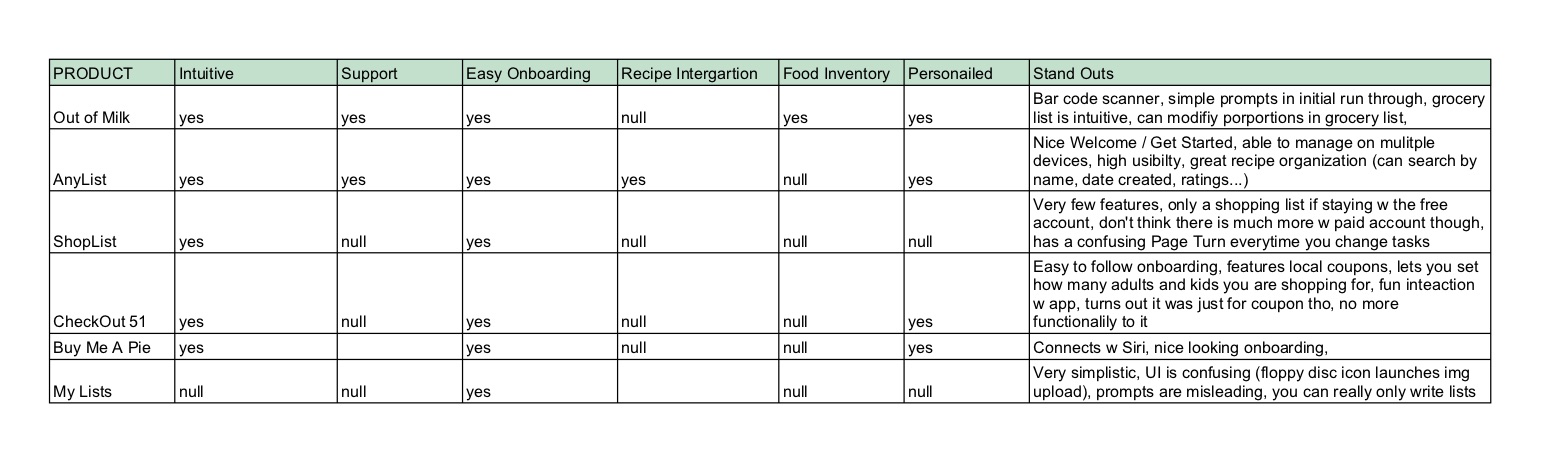
The comparative research showed that not many apps had the recipe and grocery list integrations deemed so necessary. They often had 2 of the 3 features needed for optimal organization and integration. All of them were quite easy to learn to use and had a through on-boarding process.
The three features chosen to focus on:
Shopping List:: this is a essential feature for the user to stay organized and know what they need to purchase. Staying organized was one of the key issues causing food waste. The list will be editable and searchable, which will be useful for the user to have FoodQueue adapt to their needs.
Recipe Integration:: many of the users rely on recipes regularly. Having a space to store recipes as well as create shopping lists from them will be a valuable in assisting the user in their organizational needs.
Fresh Tips:: this feature will help the user ensure freshness of their food, which will help cut back on food waste. Ideally, there would be integration directly in the shopping lists, which will make it easier for the user to store the food properly as soon as possible.
User interviews
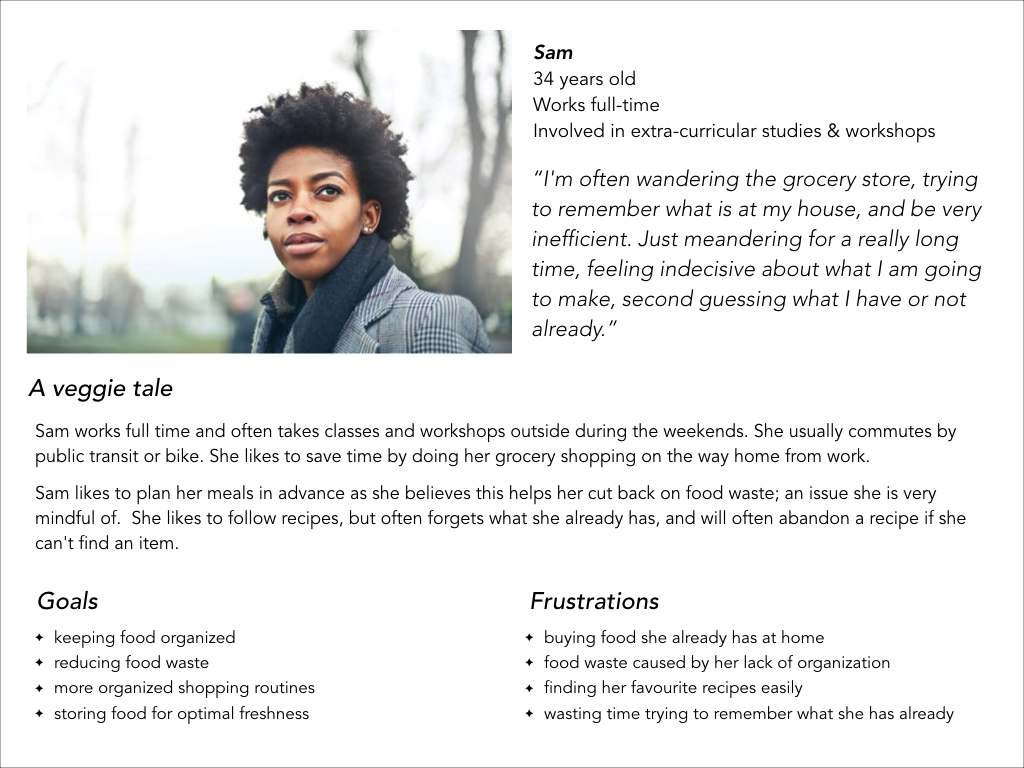
Through user interviews, I surmised that a lack of organization was one of the biggest contributors to food waste. All of the participants interviewed spoke of difficulties remembering what they had in their pantries in order to shop smarter, and often food would go to waste when they accidentally purchased doubles of. There was also conclusive evidence suggesting that many of the users bought food on their way home from somewhere, and were unable to check on what they already had at home.
The target audience for FoodQueue are urbanites with busy schedules, people who commute a lot within the city and have smartphones. They are concerned about environmental issues and like to eat healthily.
Personas
With common scenario’s in place, I was able to define detailed personas, using the vast data pool. The persona looked something like this:
Wireframing & Annotations
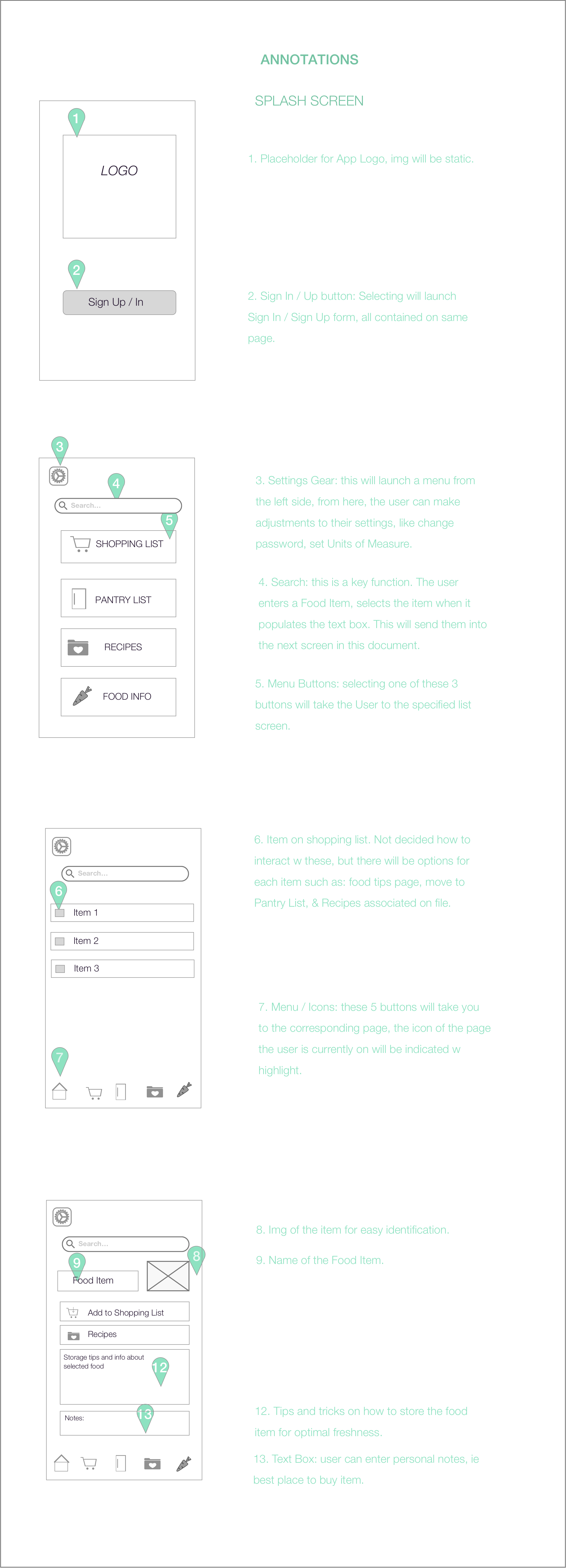
Many of these are still a work in progress. I am revisiting this part of the iteration again.
User testing
In the initial stages of the usability testing, I was pleasantly surprised my participants didn’t run into any issues. But then it occurred to me that I hadn’t pushed the limits of the test enough. From this I determined I needed to go back in and redesign the wireframes and user flow. I asked Testers to perform the following tasks:
- Log in or Sign up;
- Explore Food Tips & Tricks;
- Add food item to Shopping List;
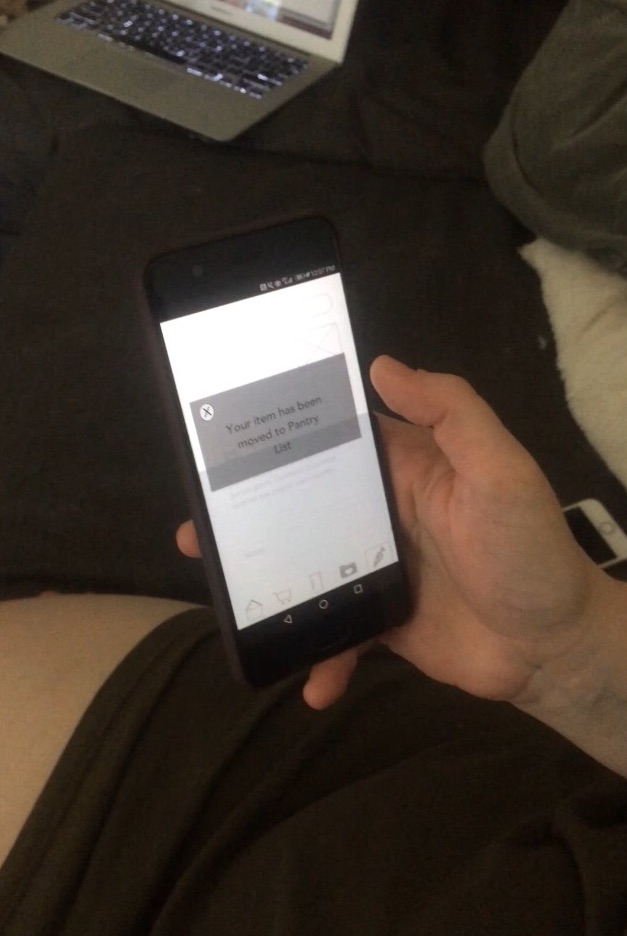
- Move item from Shopping List to Pantry List;
- Explore Recipes;
- Add item from Recipe to Shopping List.
User testing observations
One of the first things that surprised me was the Users initial response to go directly to search. The user also wanted to see prices before submitting onto a list. They choose Pantry from the list of buttons, which was directly below the Shopping List, I was not prepared for that screen flow and fumbled for a bit. The interface wasn't intuitive, this is something, and the User wasn't picking up on my vocal cues. I asked the User to Remove Onions. They tapped on Onions right away, to interact w it. Although the User saw and understood the intention of the Help key, he did not think to select it when trying to complete an unknown task. Even with prompting, the User still wouldn't touch the question mark within the screen they were having issues w, but did head to Home to get instructions.
I had expected Search to be a major component in the design, but hadn't considered that it would be the first step the User took to perform a task. I would like to dive deeper into search function usability, it was one of the Key Components for the App. The research is baking up the hypothesis that Search was a key feature for my User Group.
Results
What a great start. It being my first project, I am proud of what I accomplished but also see how much more I can learn. I enjoyed that I was able to go back a few steps and rework as I went along. I struggled w my time though, working full time took a lot away from this project. The program I did this project through was an online accelerated course to go through a single app. I am planning on going through most of the steps again. I am very unsatisfied with the UI and will be reworking it after I am finished the UI course I am currently taking.
Most people make the mistake of thinking design is what it looks like. People think it’s this veneer – that the designers are handed this box and told “make it look good”. That’s not what we think design is. It’s not just what it looks like and feels like. Design is how it works. Steve Jobs, US computer engineer & industrialist.